Skip to content

Quicon for Windows 11·Beta

Windows, tuned for competitive play.

Quicon applies measured optimizations from your hardware profile, records every value it changes and rolls back in one click.

Start 48-hour trial
Download free
  • Restore point before every change
  • Never touches game files
  • Free plan available
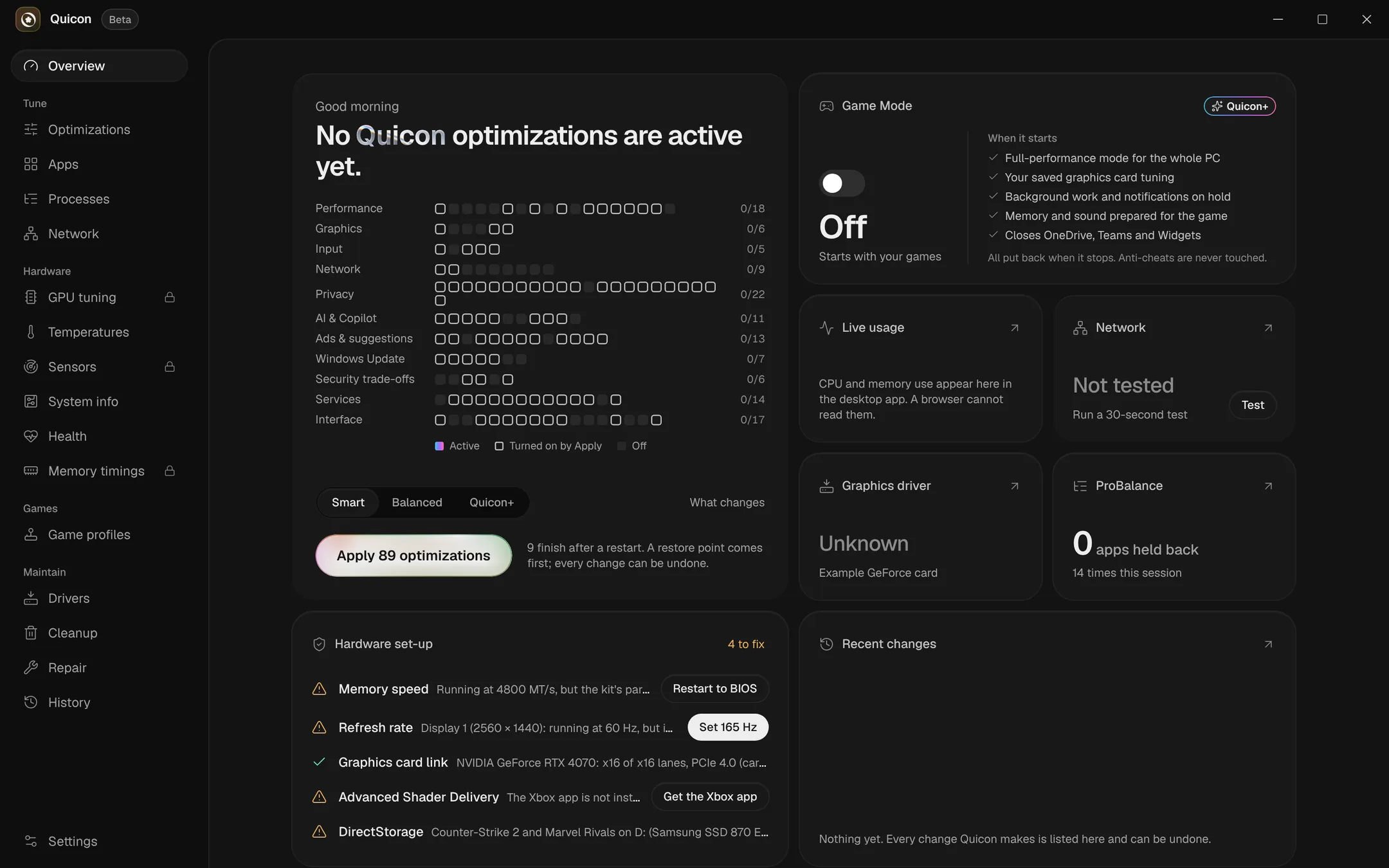
Quicon's overview: optimizations by category, one-step profiles, Game Mode and hardware checks
Interface preview with sample hardware.
optimizations, each with its trade-off
128
optimizations, each with its trade-off
categories, from performance to privacy
11
categories, from performance to privacy
restore point before every apply
1
restore point before every apply
changes without a way back
0
changes without a way back

How it works

Optimize, roll back, measure.

The three things a tuning tool has to get right, in one app.

  • Optimize

    One plan, built from your hardware

    Quicon reads your CPU, GPU, memory and display, then proposes only what fits. Review every trade-off and apply in one step.

  • Roll back

    Every change is reversible

    A restore point comes first and every previous value is recorded. Undo a single change or everything Quicon has done.

  • Measure

    A score you can compare

    Seven tests in about five minutes, each scored 0–100 by a fixed rubric: input, latency, network and stability.

Platform

Everything that decides frame time.

Settings, processes, network, drivers and hardware tuning, without scripts or guesswork.

Quicon+marks paid features

  • One-step optimization

    Smart builds a plan from the hardware Quicon detects and skips what does not fit this PC.

  • Game ModeQuicon+

    Starts with your games: full performance, background work on hold, all put back when it stops.

  • Processes and ProBalance

    Process and core rules, interrupt placement, and ProBalance to hold back apps that hog the processor.

  • NetworkQuicon+

    Latency under load, DNS switching, upload limits and one-click network optimization.

  • GPU tuningQuicon+

    Undervolt and V/F curve editing with a stepped stability test.

  • Health checkup

    Mouse, set-up, latency, network and stability tests, each scored 0–100 by a fixed rubric.

  • Memory timingsQuicon+

    A timings calculator with live readout, and memory chip identification from your modules.

  • Clean driver installsQuicon+

    Signature-checked NVIDIA packages, only the parts you choose, your game settings put back after.

  • Game profiles

    Graphics driver profiles per game: Balanced, driver default or your own settings.

  • Debloat, cleanup and repair

    Remove preinstalled apps, clear caches and run Windows' own repair tools from one place.

Pricing

Start free. Upgrade for latency.

Quicon+ is free for 48 hours. When it ends, only its changes are put back.

Free

The everyday clean-up and one-step optimization.

$0

Forever

  • The Smart and Balanced one-step profiles
  • Privacy, ads, AI and Copilot, Windows Update and interface optimizations
  • Processes: rules, ProBalance and interrupts
  • Health checkup and stress tests
  • Game profiles: Balanced, driver default or your own
  • Cleanup, repair and the full change history

Quicon Tune

Need BIOS-level work? We do it with you.

Remote one-to-one sessions for processor, memory and BIOS tuning, stress-tested until stable. Never beyond your hardware's rated limits.

Book a $4 evaluation
  • Basic

    $49

    For crashes, freezes and random shutdowns.

    • Hardware and stability diagnosis
    • Fixes for crashes, freezes and shutdowns
    • Unlimited support for 7 days
    • Free re-tune if hardware fails

    Stability fixes only

    7 days support

    Book Basic
  • BIOS Tuning

    $74

    Your BIOS, processor and memory set up for performance.

    • BIOS tuned for performance
    • Processor and memory timing optimization
    • Stress testing after the session
    • Sessions until stable, with custom profiles
    • +2 more

    Performance guaranteed

    7 days support

    Book BIOS Tuning
  • Core Tune

    $99

    A clean system with the processor and memory tuned.

    • Fresh, debloated Windows install
    • BIOS settings optimization
    • Safe processor overclock and undervolt
    • Safe memory overclock
    • +4 more

    Performance guaranteed

    14 days support

    Book Core Tune

FAQ

Straightforward answers, so you can move forward with confidence.

System
Windows 11, 64-bit (build 22000 or newer)
Access
Administrator rights, asked for at start
Updates
Signed automatic updates, installed when you close Quicon
Tools
PresentMon and 7-Zip bundled, verified byte-for-byte before use

Still have questions? Our team is here to help.

Contact us
  1. Yes. The free version covers the Smart and Balanced profiles, privacy, ads, AI and interface optimizations, processes, the health checkup, stress tests, game profiles, cleanup and repair. Quicon+ adds the tuning that works on latency and hardware, and you can try it free for 48 hours.
  2. Yes. A restore point is made before anything applies, and every previous value is recorded. History can undo any single change or everything Quicon has done.
  3. Quicon changes Windows, driver and hardware settings, never game files, and anti-cheats are never touched. Tuning stays within your hardware's rated limits, and every change is stress-tested.
  4. Quicon waits 3 days, then puts back only what Quicon+ changed. Your free optimizations stay as they are.
  5. An anonymous summary of the PC (processor, graphics card, memory, drive type, driver and Windows version), which optimizations are on, and FPS figures from game sessions. Your name, account, email, PC name, serial numbers, files and what you type are never sent, and IP addresses are not stored. Combined statistics may be shared with hardware and game companies; single PCs or sessions are never sold. You can see exactly what is sent in Settings.
  6. Quicon tunes Windows, drivers and the graphics card from inside the app. A Quicon Tune package goes further with you on a call: BIOS, processor and memory tuning, a clean Windows install and stress testing until the system is stable.
  7. BIOS Tuning, Core Tune and Full PC Tune come with a performance guarantee; Basic is about stability, so it has none. Results depend on your hardware and cooling, so the evaluation comes first, and if your PC is unlikely to gain, we tell you before you buy.
  8. A stable connection, a microphone and your games installed. Back up your files: Core Tune and Full PC Tune include a fresh Windows install (the Quicon app itself never touches your files). Note the problems you see and when they happen.

Try Quicon+ free for 48 hours.

Restore point first. Roll back anytime.